Welcome to RVForums.com

  • Register now and join the discussion
  • Friendliest RV Community on the web
  • Modern site for PC's, Phones, Tablets - no 3rd party apps required
  • Ask questions, help others, review campgrounds
  • Get the most out of the RV Lifestyle
  • Invite everyone to RVForums.com and let's have fun
  • Commercial/Vendors welcome

7 antennas off - 2 on - here is what I did

Welcome to our community

  • Register now and join the discussion
  • Modern secure site, no 3rd party apps required
  • Invite your friends and let's have fun
  • Commercial/Vendors welcome
  • Friendliest RV community on the web
I put the Wi-Fi paddle antennas on and the Wi-Fi is night and day better. My android phone Wi-Fi signal test went from -90 to -54 by switching to the paddles, i.e. much stronger. Tests on the laptop verify.

This leads me to my opinionated conclusions, based on my antenna mounting location, etc.
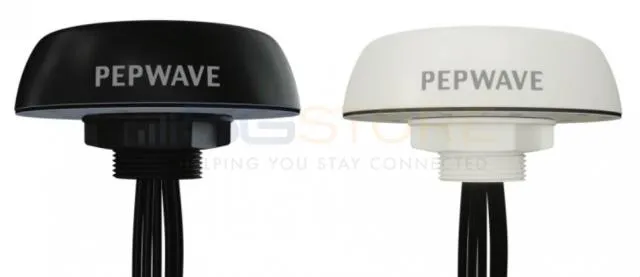
  1. Pepwave antennas are likely better as they are on 6.5ft leads instead of Parsec's 15ft leads. If I did this again I would go with Pepwave's 421 (4 cellular, 2 wifi, 1 gps).
  2. I recommend the Pepwave antennas over the Parsec but if you go with Parsec consider maybe a cellular only or cellular + gps or realize the wifi may not be ideal for inside the coach.
  3. I may have experienced better results in my prior setup as I had dedicated Wi-Fi antennas and dedicated cellular antennas, 4 in total on my roof
  4. Parsec appears to get better cellular connectivity. The pepwaves were elevated so I'm not going to attribute too much to antenna position. As I don't have both antennas available for side by side testing this takes away some merit from this conclusion as I can't test the same point in time.
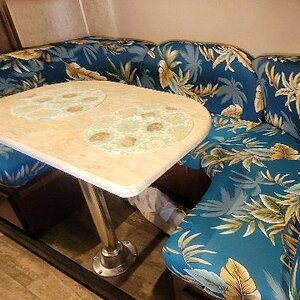
  5. Working at the dinette sucks, I miss my desk. I need a better chair that is taller and better lumbar support! The height of the dinette compared to my dinette seat setup will lead to carpal tunnel syndrome, i.e. a terrible angle for me. Need to fix this going forward as I don't to bring the desk back for reasons stated in another thread I believe...makes televator unusable without some effort which I never did.
  6. I'm leaving Pepwave 2's Wi-Fi to the roof Parsec for bringing in external Wi-Fi sources when available.
 
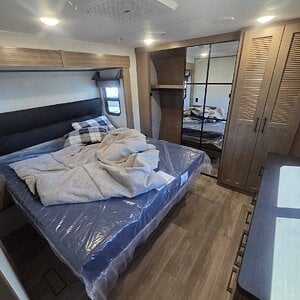
  1. Working at the dinette sucks, I miss my desk. I need a better chair that is taller and better lumbar support! The height of the dinette compared to my dinette seat setup will lead to carpal tunnel syndrome, i.e. a terrible angle for me. Need to fix this going forward as I don't to bring the desk back for reasons stated in another thread I believe...makes televator unusable without some effort which I never did.
Since you are trying laptop only, consider doing what I do. I sit in the driver’s chair, tilt the wheel slightly and place my laptop on the wheel. I pull down the arm rests on the drivers chair and rest my elbows there and adjust the chair as needed.

My pepwave sits in the cabinet above so the signal is always excellent there, and I have cup holders and a phone charger right there.
 
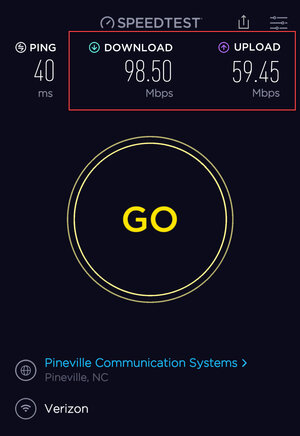
Cellular speeds continue to be very strong. At new location (Gaffney, SC) and both AT&T and Verizon are both around 100 down 80 up.
 
So it seems to me RECEIVE is good especially on the A/C shroud. Transmit has not been as desired as discussed. Resolution would be as I'm doing and using paddle antennas or install a separate Wi-Fi antenna such as I used prior to this.

speedtest.jpg

So the question is...are all in one's really a good idea? While it's more cost effective and space efficient for a 7-in-1 or better, is it really the ideal antenna setup?
 
Maybe, maybe not. It depends on your use case. Those speeds are more than enough to be zooming, netflixing, chatting, emailing and listening to music all at the same time.

Lower Upload speeds really aren’t as impacting as low download speeds unless it’s video chat.
 
It's a bad idea to broadcast your wifi outside the rv. Its even worse doing it when you intend to use it inside.

Exterior wifi antenna should be for accessing campground wifi.

By broadcasting on the outside you are adding rf noise to the campground and hurting your own usable signal.

I use a pair of deco m9s inside the rv, set to very low output.

The pepwave wifi is for Wan use only on my setup.
Really? How do you propose not broadcasting your wifi through the walls of your coach. 2.4 and 5ghz are designed to go through walls. I can see 8 of my neighbor's routers on a scan right now.
 
Really? How do you propose not broadcasting your wifi through the walls of your coach. 2.4 and 5ghz are designed to go through walls. I can see 8 of my neighbor's routers on a scan right now.
You can't stop it, but you can limit it and be smart about it.

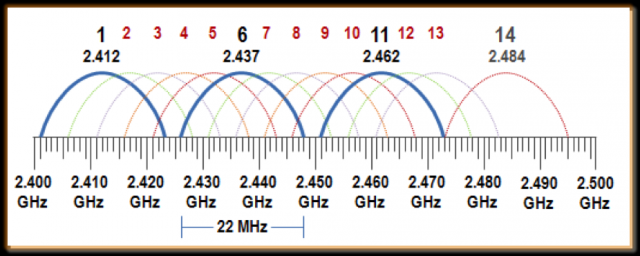
2.4ghz has only 3 channels. Parks are mostly broadcasting on 2.4ghz using a 120degree beam so that their channels don't overlap. This wonderful design is thrown out with the king routers and winegard routers that are rooftop configured to broadcast at max signal

The rv parks already had a bad name for wifi. The industry has ensured the bad name stays by adding so much rf pollution.

Going to 5ghz gives a lot more options, but is still limited.

None of this can be stopped, but we what you can do to make sure you have the best possible signal is turn your output to lowest power and disabling 2.4 if possible. I could not disable 2.4 due to the nest smoke detectors and the tank automation.

By running your 2.4 and 5g on low power settings, your devices will connect while in your rv and around. It won't work when you walk around the park, but I would say that's a good thing.

RF pollution is a big deal and getting worse. By educating others we can stretch the useful life of 5g until the 6g catches on...then who cares.
 
MIMO makes it even worse as they are designed to scatter and collect bounced/reflected signals off everything. 5Ghz distances help but MIMO will still collect through their multiple antennas.
I would venture to say most people haven't even changed the default password on their router, let alone gotten into the config pages to tweek anything in them. They plugs it in, it works, they are happy.
 
most campgrounds take an offense approach to wifi, which usually results in no usable wifi for any guests. I wish it was required to be an amateur radio license holder at minimum to setup WiFi networks in any commercial setting. At least the basic knowledge how radio frequency works, and what RF reflection is would cut down on most of the problems.

I have seen campgrounds with omni 360's broadcasting on channel 4, which as you know, knocks out 2 usable channels.

fig%201.png


The only channels that should ever be used are 1,6,11 and you should never allow the distance of the signal to overlap on the same channel.

This means if your campground is broadcasting on 1, then you should change yours to channel 6 for the rebroadcast.
 
Cellular is working well with antennas mounted on the AC shrouds.

IMG_3284.PNG
 
Then of course this morning I wake up to Verizon showing 0.15 Mb/s. Back to AT&T which is more stable bandwidth. Hate cellular!
 
Very happy about Parsec Husky cellular, very unhappy with its WiFi. It may very well be the AC shrouds are a problem for WiFi, I don't know. Regardless, I just ordered 2 x Puma 201's (WiFi only) which will go back to what I had before for roof WiFi antennas leaving the Parsec's for cellular.

 
I was thinking today about the poor Wi-Fi from the Parsec Husky, at least in my setup... my hunch is that Parsec built in a ground plane in this massive antenna and as such the downward connectivity is limited. Pepwave's antennas are small and obviously don't have this large platform that I suspect is a ground plane which is why I had better downward coverage for Wi-Fi.

My Pepwave Wi-Fi antennas have arrived and will go up at some point in the coming months as the coach is in storage for several months now. Antenna towers/mounts are 3D printing as I type this.
 
Today was the day, ya know, camping, to put the Pepwave antennas on the roof again as I got two new WiFi pepwave antennas (formerly known as 201's). As I had an available path over the driver's AV box I dropped the lines through and connected to perform a test. Welp, the test didn't go well. I'm not sure what I had so right the first time that is not happening now but long story short, I quickly removed the antenna and sealed the path back up. However not all is lost. Instead of dealing with rabbit ears flopping around I connected the pepwave antennas to the pepwaves (both of them) and will use these as indoor antennas. They are working well and now my OCD'ness won't have to deal with rabbit ears not sitting perfectly.

Saga closed, no more antennas on the roof. Very pleased with Parsec cellular performance so my conclusion is, put your cellular on the roof, your wifi inside, and be done with it.
 
I think my conclusion is going to be going back to rabbit ears. They seem to be the best for WiFi.
 

Latest posts

Latest resources

Back
Top Bottom